
The story mapper is where an Inkfold editor draws the clickable regions on each printed page: one box per story or advert. A daily paper has twenty to forty of them per edition, every day. In version 1.0 a region could be drawn and redrawn, nothing more. For Inkfold 1.1 we rebuilt it around two ideas: grab what you see, and never take your hands off the keyboard if you do not want to.
One code path for mouse, pen and touch
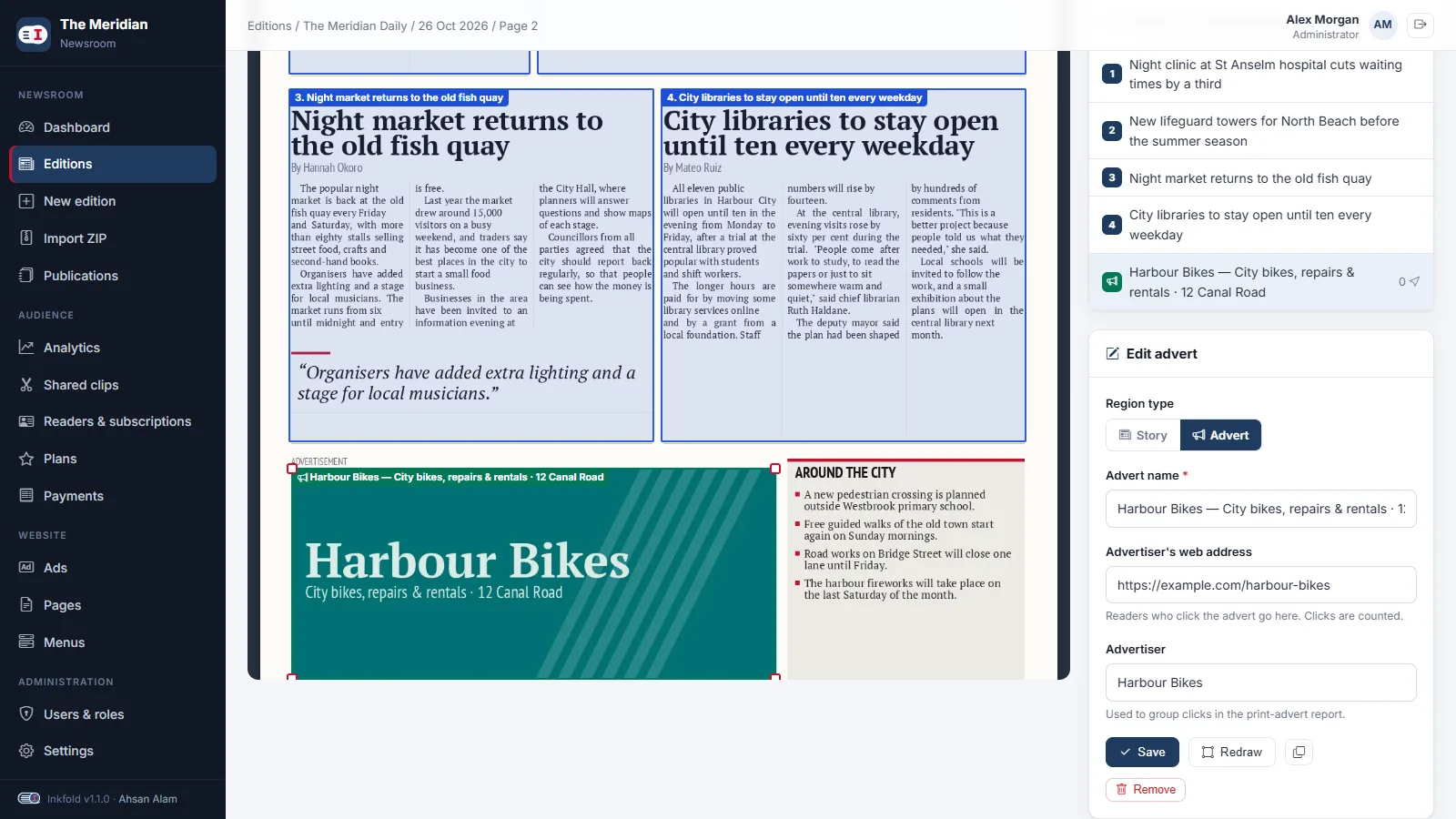
The old mapper had separate mouse and touch handlers that drifted apart. The new one uses pointer events throughout. A press on empty page starts a new rectangle; a press on a region selects it and starts a move; a press on one of its four corner handles starts a resize from that corner. Every operation works on fractions of the page and is clamped to the page edges, so a region can never be dragged off the paper.
Save on release, undo any time
There is no “save” button for geometry. When the pointer is released after a move or resize, the new box is sent with a small JSON PATCH request and the region flashes green on success or red on failure. Before saving, the previous box is pushed onto an undo stack of fifty steps, and Ctrl+Z restores it, both on screen and on the server.
The keyboard map
- Arrow keys nudge the selected region by 0.2 percent of the page; with Shift, by 1 percent.
- Alt with arrows resizes instead of moving.
- D duplicates the region just below the original, ready to be moved into place.
- Delete removes it after a confirmation; Esc deselects.
Nudging produces many tiny changes, so the mapper waits until the keys have been still for half a second, then saves once and records a single undo step for the whole run. Shortcuts are ignored while the focus is in a form field, so typing a headline that contains a “d” does not duplicate anything.
Stories and adverts in the same tool
A region now has a type. A story gets a headline, a section label, its text and an optional “continued on page” link; an advert gets the advertiser’s name and web address, and its clicks are counted on the public site. The form switches fields when the type changes, and adverts are drawn in a different colour so they are easy to tell apart on a busy page.
Yesterday’s layout as a starting point
Many pages repeat every day: the masthead, the weather box, the fixed advert at the bottom of page 3. “Copy previous layout” takes the regions of the same page number in the most recent earlier edition and copies them onto the current page. Adverts keep their advertiser and link; stories get fresh headlines and text from the PDF when it is available, as described in our post on PDF text coordinates. The editor then nudges what moved.
Key takeaways
- Use pointer events once instead of separate mouse and touch code.
- Save geometry on release and keep an undo stack that also reverts the server.
- Debounce keyboard nudges into one save and one undo step.
- Let repetitive work start from yesterday’s result.
Earlier in the series: importing an edition from one ZIP. Try the mapper in the Inkfold demo newsroom; the software is on Charming Theme.
Building an internal tool that people use all day? Let’s Talk — ArtinTech Solution designs editors that save teams real hours.