
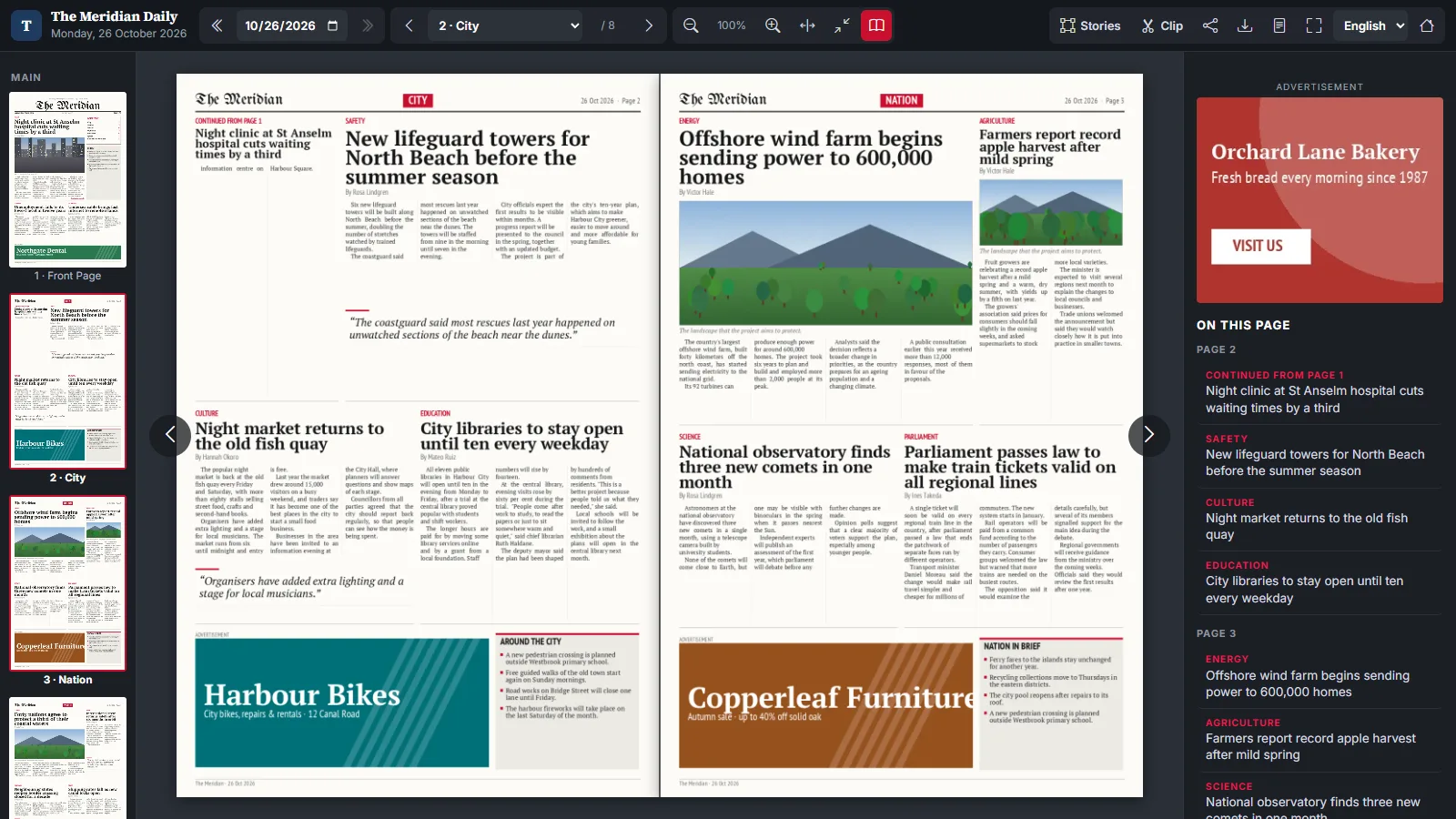
Newspapers are laid out in spreads. An advert runs across the gutter, a feature starts on page 4 and finishes on page 5, and the reader’s eye expects both pages side by side. Our e-paper reader originally showed one page at a time. In Inkfold 1.1 it can show facing pages, and getting that right touched more of the reader than we expected.
Which pages belong together
A printed paper starts with the front page on its own, then pairs 2–3, 4–5 and so on, with the last page alone when the count is even. The reader computes the visible set from the current page index with exactly that rule, so jumping to page 5 opens the 4–5 spread and the address bar shows the first page of the pair. Navigation then moves by spread, and the page counter reads “Page 4–5”.
Two pages, one height
Pages in one edition are not always the same size: a supplement may be a tabloid inside a broadsheet. Each sheet is therefore scaled to the height of the first visible page, and the spread is laid out in a single flex container with a four-pixel gutter. Zoom and pan act on that container, not on the individual pages, so both pages always move together and the story regions inside them, positioned in percentages, stay exactly on top of the printed stories.
Only where it makes sense
A spread on a phone is two unreadable stamps. The reader only uses spreads when the viewing area is at least 760 pixels wide, switches it on by default from 1,200 pixels, and remembers the reader’s choice in local storage. Below the threshold the same button shows a short hint instead of squeezing two pages into a narrow screen.
Everything else had to follow
- Story list: the side panel lists the stories of both pages under their own page headings.
- Locked pages: on a premium edition one half of a spread may be free and the other locked; each sheet renders its own subscribe box, sized relative to the page so it scales with the zoom.
- Preloading: the next spread’s medium images are fetched in advance, as described in our post on page image optimisation.
- Right-to-left: in Arabic the interface mirrors, but the pages stay in printed order, because that is how the paper was made.
Key takeaways
- Derive the visible pages from one rule: front page alone, then even–odd pairs.
- Scale every sheet to a common height and transform the container, not the pages.
- Offer spreads only on wide screens and remember the reader’s preference.
- Check every feature that assumed “one page”: lists, locks, preloading and direction.
See the spread in the Inkfold live demo; the software is available on Charming Theme.
Planning a digital edition for your publication? Let’s Talk — ArtinTech Solution builds reading experiences like this one.