
🌐 Read this article in another language: English · Dansk · Español · Deutsch · Français · Bahasa Melayu · العربية · 简体中文 · 日本語
Web scraping is the process of extracting data from websites automatically, for research, price monitoring, lead lists, market analysis or feeding data into internal systems. In Python, two tools dominate the conversation: BeautifulSoup and Scrapy.
They are often compared as if they were competitors, but they solve different problems. BeautifulSoup is a library for parsing HTML. Scrapy is a complete framework for crawling websites at scale. This guide explains the difference with real code and helps you choose the right tool for your project.
What is BeautifulSoup?
BeautifulSoup (the bs4 package) reads an HTML or XML document and turns it into a tree you can search with simple Python methods such as find(), find_all() and CSS selectors via select(). It does not download pages by itself, so it is almost always paired with an HTTP library such as Requests.
- Very easy to learn, even for Python beginners.
- Tolerant of messy, badly formed HTML.
- Works with different parsers: the built-in
html.parser, the fastlxml, orhtml5libfor browser-like parsing. - Ideal for small scripts and one-off jobs.
What is Scrapy?
Scrapy is an open-source framework for building web crawlers, called spiders. It handles the full workflow: sending requests, following links, parsing responses, cleaning data and exporting it.
- Asynchronous by design. Scrapy sends many requests at the same time, which makes it far faster on large sites.
- Built-in politeness. Obeying robots.txt, AutoThrottle, download delays and retries are simple settings.
- Item pipelines clean, validate and store data in a database or file.
- Feed exports write JSON, CSV or XML with a single command.
- Middlewares let you customize headers, proxies, caching and error handling.
The same scraper in both tools
The example below collects every quote and author from quotes.toscrape.com, a site built for practicing scraping. On the left is Requests with BeautifulSoup, on the right a Scrapy spider.
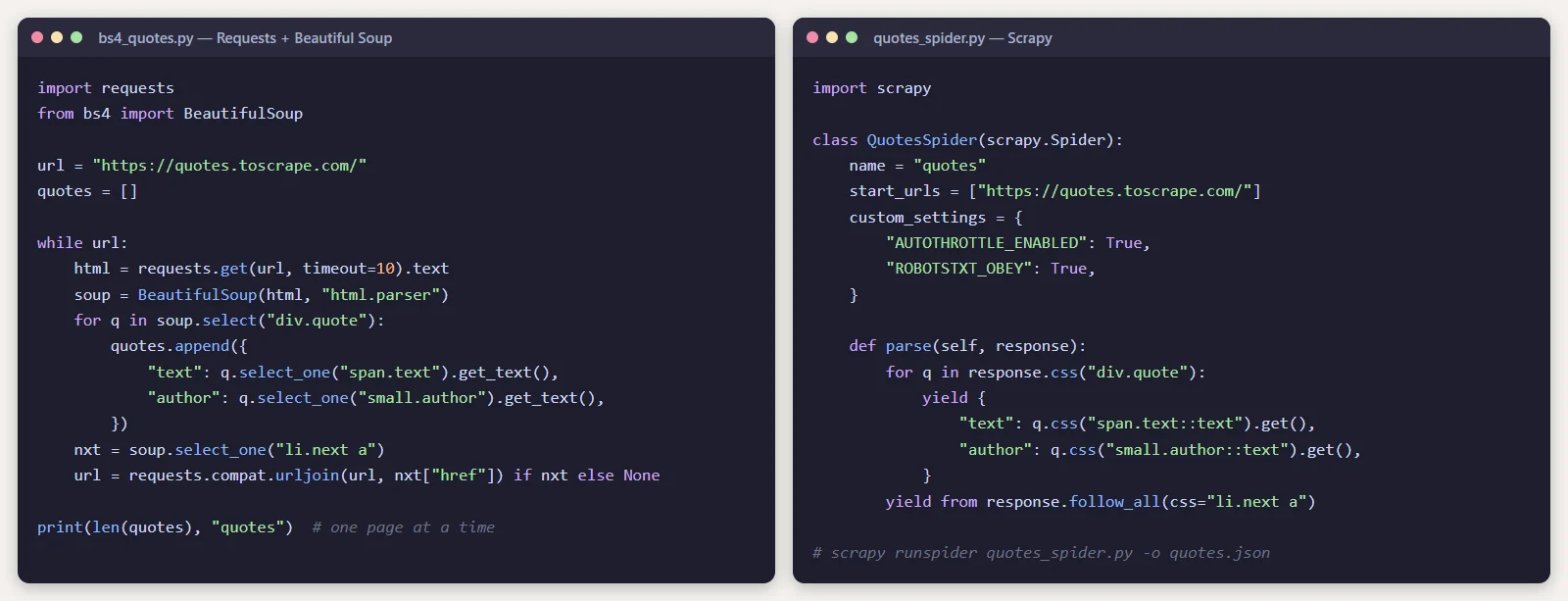
Both produce the same data. The difference shows when the job grows: the BeautifulSoup script waits for each page before requesting the next one, while Scrapy downloads many pages in parallel and handles retries, throttling and export for you.
To try them yourself:
pip install requests beautifulsoup4
python bs4_quotes.py

pip install scrapy
scrapy runspider quotes_spider.py -o quotes.json
Side-by-side comparison
| BeautifulSoup | Scrapy | |
|---|---|---|
| Type | HTML parsing library | Complete crawling framework |
| Learning curve | Very gentle | Moderate |
| Downloads pages | No, needs Requests or httpx | Yes, built in |
| Speed on many pages | Slow unless you add concurrency yourself | Fast, asynchronous by default |
| Following links | Manual | Built in |
| Data export | Manual | JSON, CSV and XML built in |
| Throttling and retries | Manual | Built in |
| JavaScript-rendered pages | No | No, needs an add-on |
| Best for | Small scripts and one-off jobs | Large or recurring crawls |
When to choose BeautifulSoup
- You need data from a few pages, or you are scraping once.
- You are learning web scraping or Python.
- You already have the HTML, for example from an API response, email or saved file, and only need to parse it.
- You want to add a small scraping step inside an existing script or application.
When to choose Scrapy
- You need to crawl hundreds or thousands of pages.
- The scraper will run regularly and must be reliable.
- You need to follow pagination and links across a whole site.
- The data must be cleaned, validated and stored in a structured way.
- You want built-in politeness controls so you do not overload the target site.
What about JavaScript-heavy websites?
Neither BeautifulSoup nor Scrapy runs JavaScript. If the content you need is loaded by JavaScript after the page opens, you have two options:
- Look in your browser’s developer tools for the API request the page makes. Calling that JSON endpoint directly is usually faster and more stable than scraping HTML.
- Use a headless browser such as Playwright or Selenium. Playwright can be combined with Scrapy through the
scrapy-playwrightplugin, or used on its own with BeautifulSoup for parsing.
Can you use both together?
Yes. Scrapy has its own fast selectors, but nothing stops you from passing a response to BeautifulSoup inside a Scrapy callback if you prefer its API. Many teams prototype with Requests and BeautifulSoup, then move to Scrapy once the job needs to scale.
Scrape responsibly
Being able to scrape a website does not mean you are allowed to. Before you start:
- Read the website’s terms of service and respect its robots.txt file.
- Limit your request rate so you never slow down the site for real visitors.
- Do not collect personal data without a lawful basis. Laws such as the GDPR apply to scraped data too.
- Prefer an official API when one exists.
The verdict
For learning, small projects and quick data extraction, BeautifulSoup is the best starting point: simple, forgiving and easy to read. For anything large, recurring or business-critical, Scrapy is the better tool, because it gives you speed, structure and politeness controls that you would otherwise have to build yourself.
If scraped data needs to end up inside your own dashboards, CRM or ERP, the scraper is only one part of the system. At ArtinTech Solution we build custom internal systems and web applications that collect, validate and use data like this. Tell us about your project.
Frequently asked questions
Is Scrapy faster than BeautifulSoup?
For crawling many pages, yes, because Scrapy sends requests concurrently while a basic Requests and BeautifulSoup script fetches one page at a time. For parsing a single document, the difference is small.
Is BeautifulSoup good for beginners?
Yes. It is one of the easiest ways to learn how HTML is structured and how to extract data from it with Python.
Can Scrapy scrape JavaScript websites?
Not by itself. Use the website’s underlying API if possible, or add a headless browser through the scrapy-playwright plugin.
Is web scraping legal?
It depends on the website’s terms, the type of data and the laws in your country. Scraping public, non-personal data politely is generally lower risk, but always check the terms and get legal advice for commercial projects.