

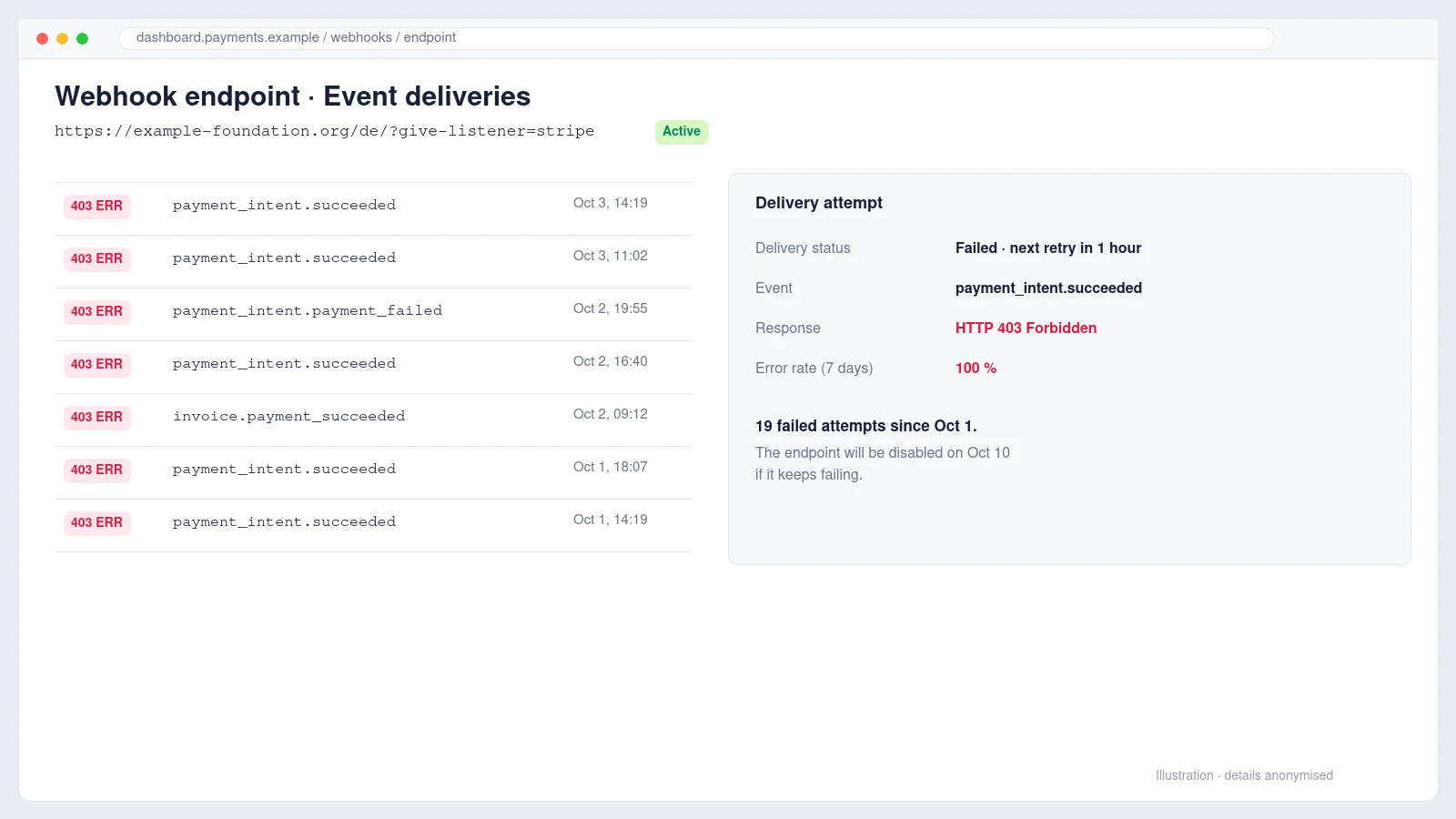
The email arrived on a Sunday morning, forwarded by the operations director of a European non-profit foundation with a single line: please see below for your information and action. Underneath was an automated message from Stripe. It had been unable to deliver webhook events to the foundation’s donation site for several days, nineteen attempts had failed, and if nothing changed, Stripe would stop sending notifications to that endpoint altogether within a week.
For a charity that takes one-off and monthly donations through WordPress, that is not a cosmetic warning. Webhooks are how the website learns that a payment actually succeeded. Without them, donations sit as pending, donors do not receive their receipts, and monthly renewals are never recorded, even though the money keeps arriving in Stripe.
This is the story of how we traced the failure, why the first problem we found was real but was not the cause, and the small change that fixed it without switching off any of the site’s security.
What a Stripe webhook does, and why a failure matters
When a donor pays, the browser is sent to Stripe and back. The website cannot trust what the browser says about the payment, so Stripe also calls the site directly, server to server, with an event such as payment_intent.succeeded. The site must answer with an HTTP status between 200 and 299. Anything else counts as a failure, and Stripe retries with growing gaps for up to three days before giving up on that event.
In this case the donation plugin was GiveWP, which listens at an address ending in ?give-listener=stripe. The site is multilingual, so there were two active endpoints, one under /de/ and one under /fr/. Both were failing, although Stripe’s email only mentioned one of them.
First finding: a real problem, but not the cause
The WordPress dashboard showed an activation error straight away. The Recurring Donations add-on had been switched off because it required a newer version of the main GiveWP plugin than the one installed. The add-on had been updated, the core plugin had not, and WordPress had quietly deactivated the add-on. Its licence was also set not to renew, so it had stopped receiving updates.
That looked like a perfect explanation, and it was worth fixing regardless. We took a full backup, updated GiveWP and reactivated the add-on. The front of the site promptly crashed with a fatal error. The stack trace pointed to a popup that embedded an old donation form shortcode, and the recurring add-on did not handle a form it could not find. We deactivated the add-on to bring the site back, corrected the popup, reactivated it, and checked the home page, the donation page and every language version.
The site was healthy again and the monthly donation option was back. The webhooks were still failing.
Reading the actual error instead of guessing
The fastest way to stop guessing is to open one failed delivery in the Stripe Dashboard, under Developers, Webhooks, and read two things: the HTTP status code and the response body. Here the status was 403 Forbidden, and the body was not a WordPress error at all. It was an HTML page titled Just a moment…, loading scripts from challenges.cloudflare.com.
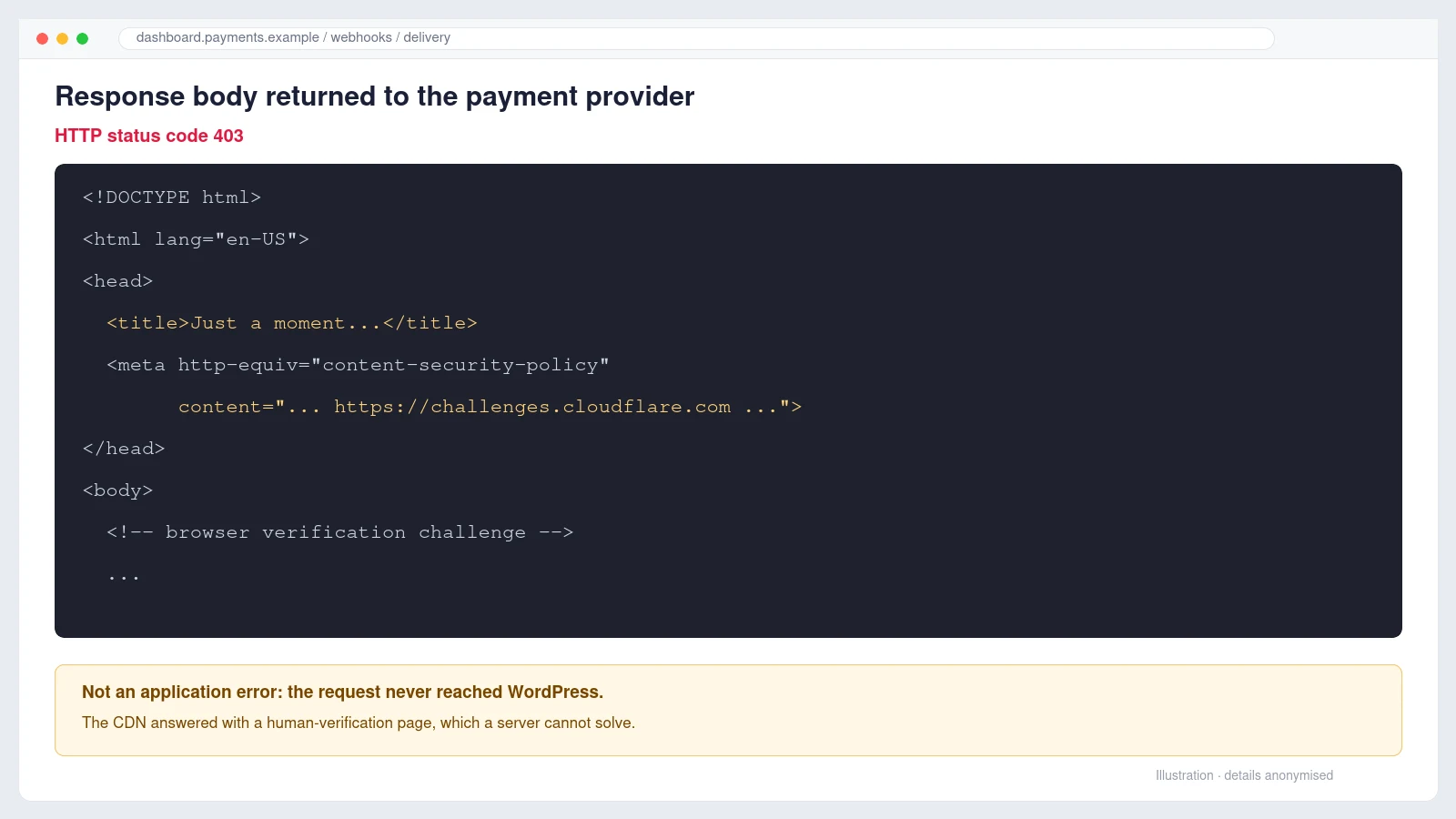
That page is Cloudflare’s browser challenge. It asks the visitor’s browser to prove it is human before passing the request on. A person in Chrome passes it in a second. Stripe’s servers are not a browser, cannot run the challenge, and so every webhook was stopped at the edge. The request never reached WordPress, which is why nothing appeared in the site’s logs.
Finding which Cloudflare feature was blocking Stripe
Cloudflare can challenge traffic from several features, and the fix depends on which one is responsible. In the zone’s Security, Analytics, Events view we filtered on the query string give-listener. Every matching request showed the action Managed Challenge and the service Security level.
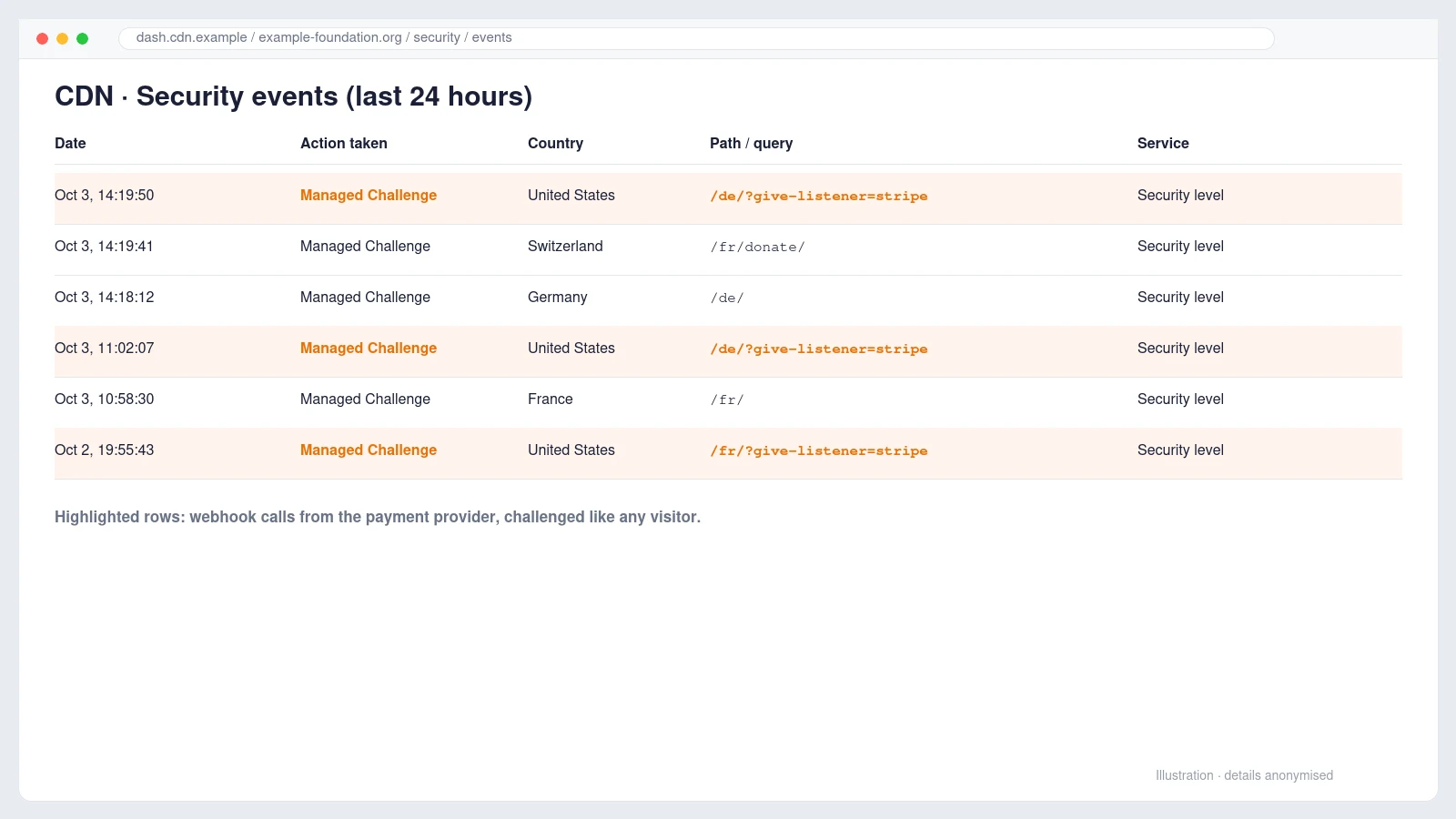
The same list showed something else worth knowing: ordinary visitors from Switzerland, France and Germany were also being challenged on normal pages. The zone’s security level had been set very high, probably in response to an earlier attack, and nobody had noticed that it was catching the payment provider too.
The fix: a narrow Skip rule, not a weaker site
Turning the security level down would have worked, but it would have changed the protection for the whole site to solve a problem with one URL. The cleaner answer is a custom rule that lets only the webhook address through and leaves everything else as it is.
- Go to Security, Security rules and create a new custom rule.
- Name it clearly, for example Allow Stripe webhooks.
- Set the match to URI Query String, contains,
give-listener=stripe. - Choose the action Skip and tick All remaining custom rules.
- Open More components to skip and tick both Security Level and Browser Integrity Check.
- Place the rule first in the list and deploy it.
(http.request.uri.query contains "give-listener=stripe")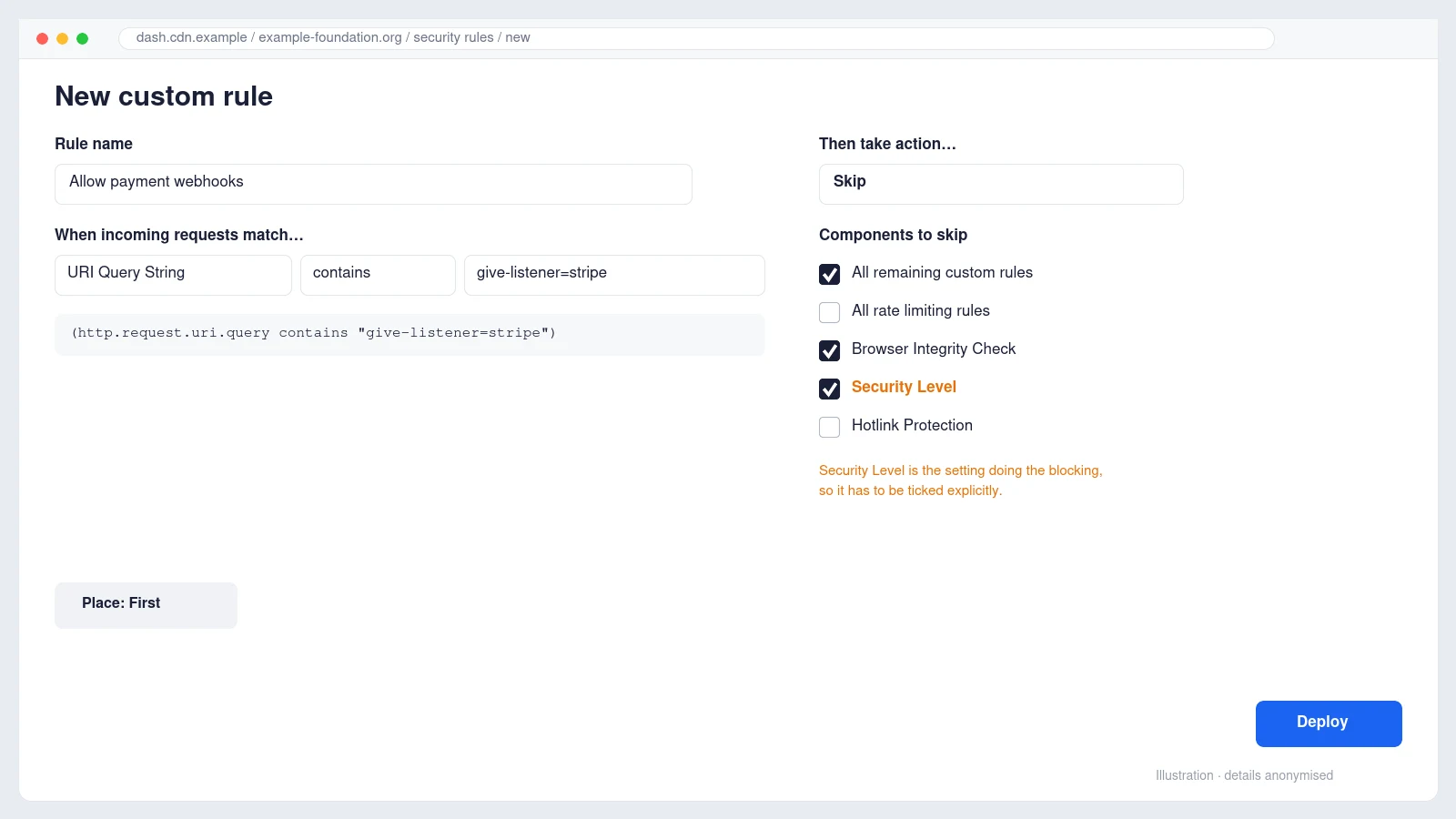
The detail that is easy to miss is step five. The first version of the rule skipped only Browser Integrity Check, the API preview showed "products": ["bic"], and the webhooks would have kept failing. The events log had told us the blocker was Security level, so that is the component that has to be skipped. One note for free plans: if the events log names Bot Fight Mode instead, a Skip rule cannot bypass it, and the setting itself has to be switched off.
Is it safe? The rule does not trust the request blindly. GiveWP still verifies every webhook against Stripe’s signing secret, so a forged request that reaches the listener is rejected by WordPress. Cloudflare’s job here was never to authenticate Stripe; that is the signature’s job.
Confirming the fix and recovering missed donations
We resent one failed event from the Stripe Dashboard and it came back 200 OK. Within the hour Stripe’s own retries began to succeed and the dashboard marked earlier failures as Delivery recovered. The next day Stripe sent a separate email confirming the endpoint had recovered.
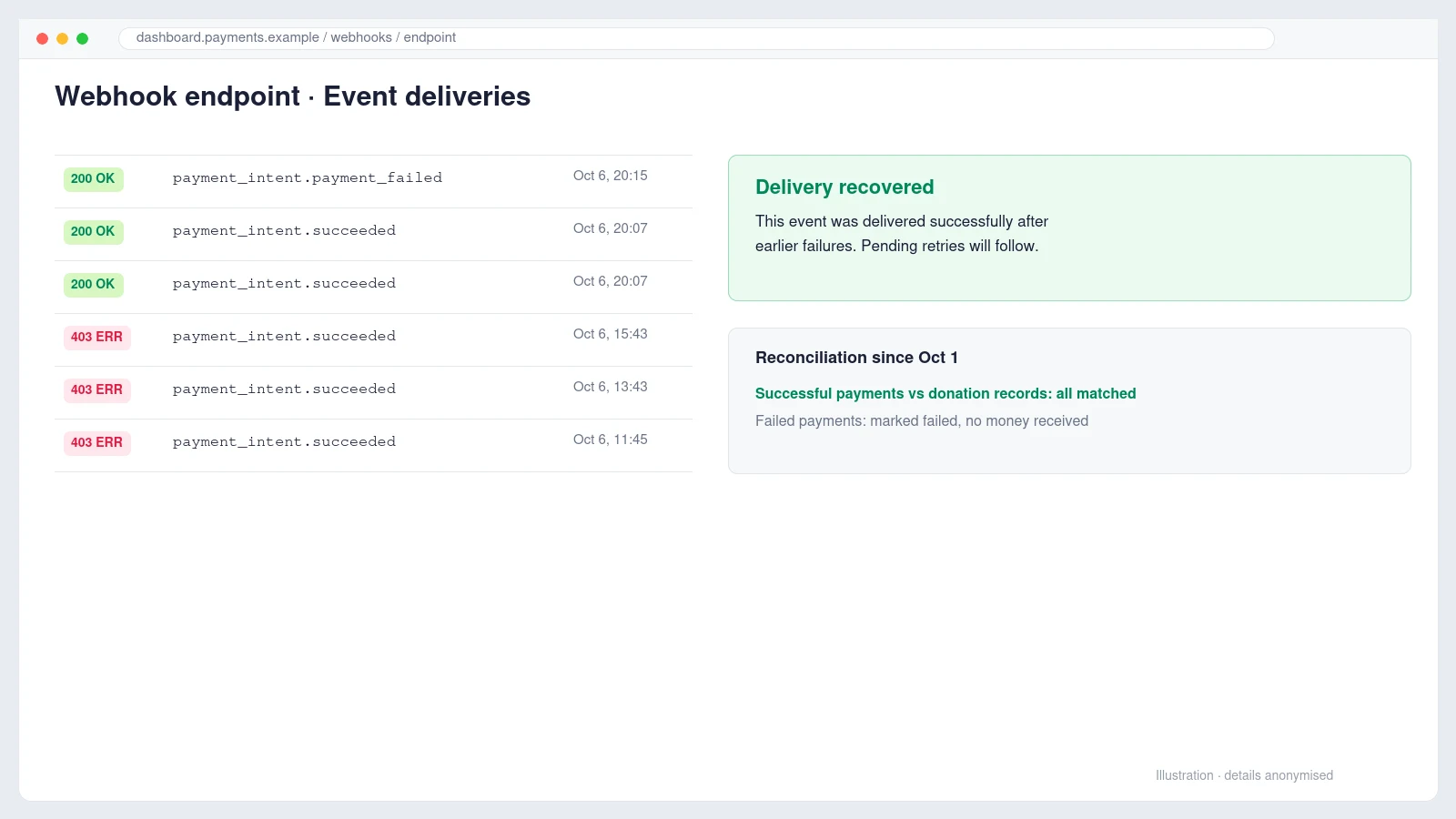
Two practical points from the clean-up. First, the Resend button only works on the most recent attempt for each event, so for events Stripe has already given up on, open the event itself and resend from there. Second, reconcile the money, not just the webhooks: compare every Stripe payment since the outage began with the donation records in WordPress. In this case every successful payment was already recorded, one payment had genuinely failed for insufficient funds and was marked as failed, and two small test payments made during the investigation were identified so nobody would count them as donations.
Lessons for any WordPress site that takes payments
- Read the response body first. A 403 that contains HTML from your CDN is not an application bug, and no amount of plugin debugging will fix it.
- Security settings and payment webhooks have to agree. Raising Cloudflare’s security level after an attack is reasonable; forgetting that it also applies to server-to-server callbacks is how donations go missing.
- Allow the path, not the world. A narrow Skip rule on the listener keeps the rest of the site protected.
- Expired add-on licences are a slow risk. They stop updates, and the next core update can deactivate the add-on without warning.
- Watch the alerts. Stripe gives roughly a week of warnings before it disables an endpoint. Make sure those emails reach someone who can act on them.
We wrote about a similar edge case where a cache and WordPress disagreed about time in an intermittent 403 caused by cache TTL, and about the routine checks that catch problems like this early in what website maintenance actually covers.
Frequently asked questions
Why do my Stripe webhooks return 403 when the site works in my browser?
Because your browser can pass a Cloudflare challenge and Stripe’s servers cannot. If the failed delivery’s response body mentions Just a moment or challenges.cloudflare.com, the request is being stopped at Cloudflare before it reaches WordPress.
Should I whitelist Stripe’s IP addresses instead?
You can, using the IP list Stripe publishes, but the list changes and has to be maintained. A Skip rule on the webhook path is simpler and, because the plugin verifies the webhook signature, it is just as safe in practice.
Do I lose donations while webhooks are failing?
The money is normally collected by Stripe, but the website does not record it. Donations stay pending, receipts are not sent and recurring renewals are missing from your records until the events are delivered or the records are corrected by hand.
How long does Stripe keep retrying?
Live-mode events are retried for up to three days with increasing gaps. If an endpoint keeps failing, Stripe emails a warning and eventually disables it.
Running donations, a shop or memberships on WordPress and seeing payment alerts you are not sure about? We handle exactly this kind of investigation as part of our WordPress development and maintenance work. Let’s Talk and we will tell you plainly what is wrong and what it takes to fix it.